
Understanding MM to Carat Weight Conversion
You’ve found the perfect vintage ring setting, but the listing notes it holds a 6.5mm stone. Does that mean you need a 1-carat diamond? Navigating MM to carat weight conversion frustrates many because shoppers frequently confuse physical dimensions with mass. Just as two people weighing 150 pounds can stand at completely different heights, gems share this exact quirk.
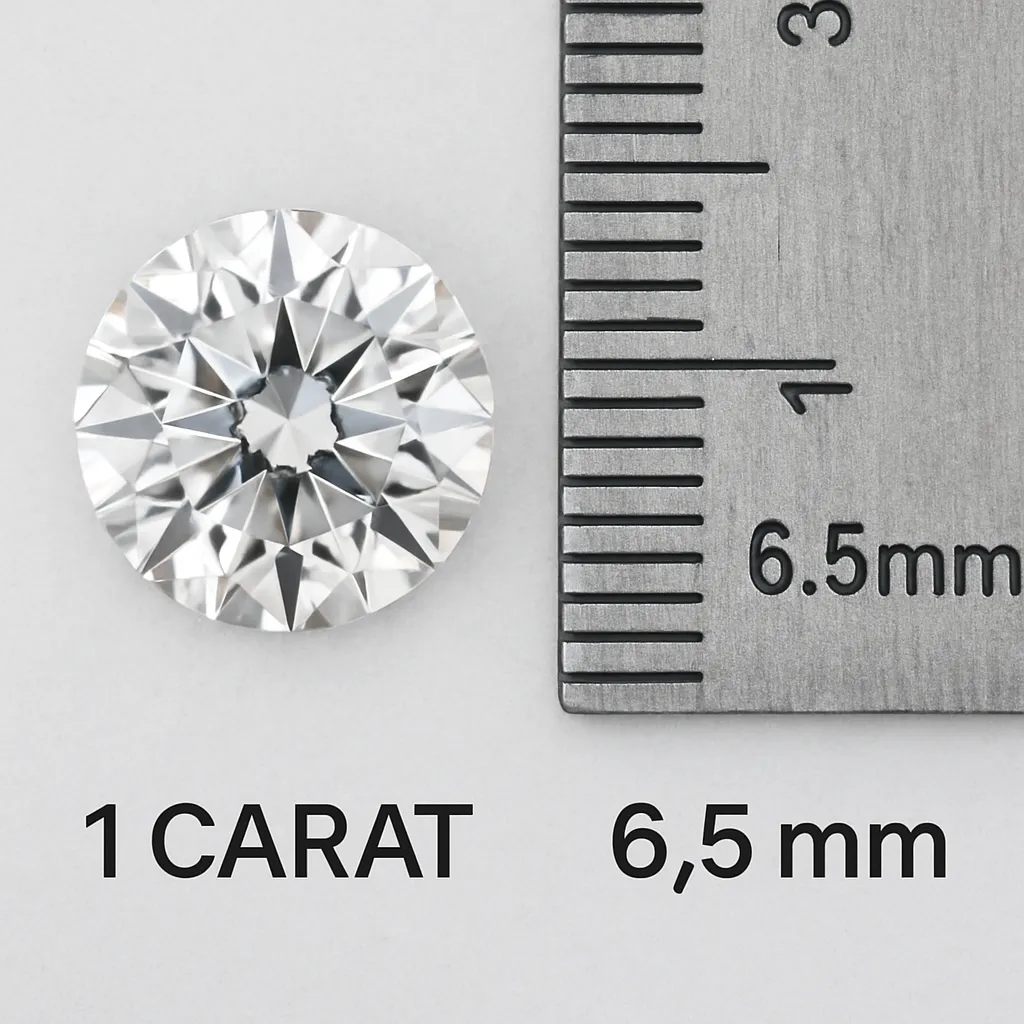
According to gemological standards, answering how many mm is a 1-carat diamond begins with the 6.5mm benchmark for round brilliants. Mastering this visual size vs actual weight ratio protects you from buying a bottom-heavy stone that hides its bulk below the surface. Ultimately, a ruler reveals what your eye sees, ensuring you get maximum visual value for your budget.
Millimeters vs. Carats: Why the Ruler and the Scale Rarely Tell the Same Story
When comparing millimeters vs carats for gemstone pricing, many shoppers get confused because carats measure a stone's weight, not its width. Think of the classic "lead versus feathers" riddle. A pound of dense lead is tiny, while a pound of feathers is huge. Similarly, a heavy 1.0-carat sapphire will look noticeably smaller on your hand than a 1.0-carat diamond because sapphires are significantly denser.
To master jeweler vocabulary, you must learn about "points" to estimate carat weight by stone dimensions. Just as one dollar equals 100 pennies, one carat equals 100 points. Here is a standard MM to carat weight conversion for round diamonds:
- 100 points = 1.0 carat (approx. 6.5mm)
- 50 points = 0.50 carat (approx. 5.0mm)
- 25 points = 0.25 carat (approx. 4.0mm)
Applying this math aligns your expectations with the physical reality of the stone.
The 6.5mm Golden Rule: Decoding the Diamond Size Chart for Round Brilliant Stones

When a balloon expands, it grows in all directions at once, which perfectly illustrates how gemstone weight actually increases. If you review a standard round brilliant diamond size guide, you will quickly notice that doubling a stone's weight from 1.0 to 2.0 carats does not double its width. While the classic 1.0-carat benchmark measures roughly 6.5mm across, jumping to a 2.0-carat stone only increases the visual face-up size to about 8.1mm because the hidden depth grows alongside the diameter.
Finding the ideal balance between weight and width relies heavily on GIA diamond proportion standards. These respected industry benchmarks ensure a gem is cut for brilliant sparkle rather than just flattened out to look unnaturally wide. Because of these precise mathematical angles, a masterfully cut 6.4mm diamond will consistently outshine and offer better value than a poorly proportioned 6.6mm stone that sacrifices light return just to hit a heavier scale weight.
Your budget stays much safer when using a reliable diamond size chart in mm to verify the physical presence of traditional round gems. Once you step away from perfect circles, however, the visual rules completely transform.
Why Ovals and Marquise Cuts 'Cheat' the Scale to Look Larger than Round Diamonds
When maximizing your budget matters, elongated diamond shapes offer a clever way to gain a larger appearance without paying for a heavier stone. This advantage comes down to "spread"—how much of the gem is visible when looking straight down at your hand. Unlike the predictable dimensions found on a standard carat size chart, shapes like ovals and marquise cuts stretch their weight across a longer surface. They essentially borrow mass from the belly of the stone and push it outward. By improving this visual size vs actual weight ratio, a 1-carat oval can easily mimic the footprint of a much heavier round diamond.
To see this optical illusion in action, compare the average surface area of different one-carat gems. While checking a princess cut mm to carat chart reveals that square stones face-up smaller than rounds, elongated cuts do the exact opposite:
- 1ct Round: ~33 sq mm (The baseline standard)
- 1ct Oval: ~39 sq mm (Roughly 15% larger face-up)
- 1ct Marquise: ~42 sq mm (Roughly 25% larger face-up)
Maximizing spread guarantees the biggest look for your money, but this visual math can also work in reverse when stones are cut too deep.
Spotting the 'Iceberg' Diamond: How Excess Stone Depth Steals Your Visual Size

If you ever wonder whether stone depth affects carat weight, simply picture an iceberg. The widest outer edge of your gem is the girdle. The V-shaped bottom below this line is the pavilion depth. When cut too deep, stones become "bottom-heavy," trapping 'hidden' carat weight beneath the surface where it cannot be seen.
Estimating diamond weight without a scale requires spotting these sneaky proportions. In fact, weight estimation formulas for mounted stones heavily factor in this depth because steep angles actively steal your face-up size. Worse, this excess bulk ruins light performance, causing brilliance to leak out the bottom rather than sparkling brightly at your eye.
Protecting your budget means rejecting these deep stones so you only pay for visible size. While these proportions easily alter diamonds, other materials follow entirely different rules due to their specific compositions.
Why a 1-Carat Ruby Is Physically Smaller Than a 1-Carat Diamond: The Secret of Gemstone Density
Imagine holding a pound of feathers versus a pound of lead. They weigh exactly the same, but the feathers take up far more space. This principle, known as the specific gravity of different gemstones, explains why density dictates a stone's visual size. Sapphires and rubies are much denser than diamonds. If you buy a vintage 6.5mm ring mounting, ordering a loose "1-carat sapphire" to fill it will end in disaster because the heavy stone will fall right through the prongs. When measuring loose gemstones for settings, you must always shop by millimeter dimensions rather than carat weight.
To see this density difference in action, consider a moissanite vs diamond size comparison alongside a heavy colored gem. Here is the typical millimeter diameter for a 1.0-carat round cut:
- Diamond: 6.5mm (The standard industry baseline)
- Moissanite: 6.5mm (Usually cut to match diamond visual proportions)
- Sapphire/Ruby: 6.0mm (Denser, resulting in a physically smaller visual size)
Knowing why carat weight can be deceiving protects your budget and your jewelry from improper settings.
How to Measure Your Gems Like a Pro: Using Calipers and Basic Estimation
Getting accurate dimensions requires the right tool. While a standard ruler works for rough estimates, investing in precision digital calipers for jewelry removes all the guesswork when measuring loose gemstones for settings. These inexpensive tools provide exact millimeter readings so your new stone fits flawlessly into its mounting.
What if your gem is already set in a ring? Figuring out an heirloom's dimensions requires a careful approach, especially when estimating diamond weight without a scale. Use this quick method:
- Position precisely: Place the caliper jaws gently across the widest visible part of the gem.
- Avoid the metal: Ensure the measuring tips touch only the stone, never the surrounding prongs.
- Match the data: Compare your millimeter reading to a standard size chart.
Applying these measurement techniques prepares you to evaluate any stone's true physical footprint.
Mastering Your Gemstone Purchase: Three Steps to Ensuring Visual Value
A heavier gemstone doesn't always mean a larger appearance. By applying MM to carat weight conversion, you can look past the scale and focus entirely on what your eye actually sees. Before buying, apply a simple three-step visual value check: measure the exact setting limits, evaluate the top spread for maximum surface area, and check the depth so you never pay for hidden weight.
This perspective completely changes how you shop. Armed with a size conversion chart, you can easily compare gems and determine carat weight by stone dimensions. Use these exact measurements to spot bottom-heavy stones and effortlessly avoid paying for unseen bulk. You can then confidently select a perfectly proportioned stone that delivers maximum visual value.